
See your business app working before it is built.
Most business software starts as a requirements document nobody can picture until it is built. With CitySoft Mainline, your team clicks through real screens, built with AI around your processes, early on. You agree on what you can see, and we deliver exactly that.
Shown: a quoting portal built on Mainline for a fictional company, with sample data.
Design around real screens, not a written document
Your team sees the app working from the first meeting. What gets signed off is what gets delivered.
The usual way
- Pages of requirements your team has to imagine
- Surprises at testing, and rework to fix them
The Mainline way
- Working screens your team can click through and test
- Sign off what you have seen, so there is no guesswork
Tell us the problem
What your team needs, and why.
See it working
We use AI to build a working prototype around your process.
Refine together
Your team tests it and signs off the design.
Go live on Mainline
The same design, connected to your ERP and tested.
What we build on Mainline
Reports, dashboards, portals and apps designed with your team, in your branding, and connected to your ERP.
- Sales and quoting
- Field and delivery
- Dashboards
- Scheduled reports
- Customer portals
- AI assistants
Snapshot reports
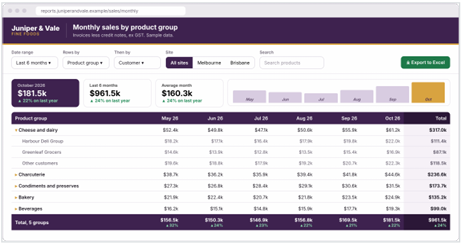
Weekly management reports and monthly sales by customer. Generated on a schedule with your data only, then shared behind sign-in or emailed to the people who need them.
Live dashboards and apps
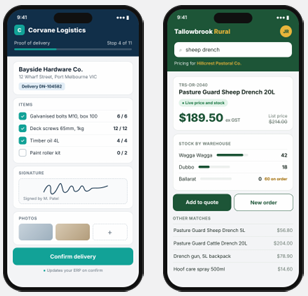
Sales apps, quoting portals and stock lookups. Each screen asks for approved business operations, scoped to the signed-in user, at the moment they need it.
Example screens built on Mainline. Fictional companies and sample data.
Why not just build it with an AI chat tool?
Great for trying out an idea. Mainline gives you the same speed, built to run your business on.
| Topic | AI chat tool app | CitySoft Mainline |
|---|---|---|
| Your ERP data | Spreadsheet exports or direct database access | Through your ERP's own APIs, so it stays in charge |
| Security | No proper login, keys left in the code | Login security, single sign-on and a full audit trail |
| Where it runs | A laptop or personal cloud account | Our secure, Australian hosted platform |
| Testing | Works in the demo | Fully tested, then signed off by you |
| Support | Leaves with whoever built it | Supported by our consultants and developers |
| Over time | Breaks when your ERP changes | A maintained platform, kept current with your ERP |
Use AI for speed. Use Mainline to make it safe to run your business on.
Secure, maintained, built around your ERP
Pricing, credit, approvals and business rules stay in your ERP. Nothing is rebuilt outside it, and no single layer is trusted on its own.
ERP stays in charge
Everything runs through its own APIs. Any write to your ERP waits for a person to approve it.
Australian hosted
Secure and separate from your ERP, with each client on its own isolated stack.
Login security
Single sign-on with MFA using your own Microsoft 365 or other work account, and a full audit trail.
Maintained for you
Kept current, tested and supported by our consultants and developers.
Four data paths, none of them direct
Every Mainline item uses one of four paths. None of them gives anyone, or any AI, direct access to your ERP database.
- Live
Stock, pricing, customer lookups, quotes. The app calls an approved operation, which calls your ERP's API.
- History
Reports, dashboards and trends. A read-only copy of only the fields needed, refreshed on a schedule, one per client.
- Scheduled
Snapshot reports, alerts and digests. Filled with your data on a schedule and sent as a secure link or PDF.
- AI
Chatbots and assistants. The AI uses the same approved operations, with the user's role. Any write waits for human approval.
One delivery path, every time
Every app, and every later change, follows the same eight stages and four sign-off gates. Nothing reaches your live users until you have approved it in your own test environment.
- 1
Request
You raise the need. We log it with an owner and a business goal.
- 2
Intake
Business case, risk score and the right data path, agreed up front.
- 3
Mockup and spec
A clickable mockup with sample data, plus a functional spec you refine with us.
Gate 1You sign off the spec - 4
Technical spec and estimate
Mapped to proven operations, with security notes and a full quote.
Gate 2You accept the quote - 5
Build
The approved design finished to our build rules and connected to your ERP.
- 6
Test
Automated tests and scans, peer review, and testing against the signed spec.
Gate 3Internal sign-off - 7
Your UAT
Deployed to your test environment for your named testers only.
Gate 4You sign off UAT - 8
Live
The exact build you approved goes live, with release notes, a tested rollback and support.
A failed test or gate sends the work back a step. Nothing skips ahead, and small changes still go through testing and your sign-off.
Works with the ERPs we support
One framework, one adapter per ERP. Screens ask for business operations, never ERP tables, so the same design works across systems.
Business case first
We don't build things for the sake of it. If your ERP or the vendor's own tools already cover the need, we'll tell you and use those.
Hosted or cloud ERP
Sage X3 and SAP Business One hosted by CitySoft, or Sage Intacct and Business Central in the vendor's cloud. The app stays the same.
Extra care for sensitive data
Finance, HR, payment and customer-facing items get a stronger review, tighter controls and testing before anyone outside your team sees them.
Have a process your ERP doesn't quite fit?
Tell us what your team needs. We'll show you working screens early, and you only sign off what you have seen.